Sunday, 4 May 2014

Tool Eval

For the majority of effects this tools will be able to manage, but when colliding with hard objects, like a wall the force on the agents get a bit erratic and can the results make the end look like it cant find a direction to face

The python tools work very well with the Node Editor and making the switch has allowed me to easily incorporate all of Mayas nodes into the system. or even other peoples own nodes.

The PP attributes were a failure, and i think would need a whole new node to replace the PP attribute system, and maybe specialize to to only fit the crowd systems needs

Wednesday, 30 April 2014

Demos

So Without the battle node, the tool is still successful in being able to generate and maneuver and generate a crowd system, that can interact with other agents in order to avoid interpenetration as well as collide with geometry.


FAR FAR too slow

So i implemented the updating of the attributes functions as Mel commands, and the results were so slow i want even able to produce 10 frames of the animation.  Each frame took at least 2 minutes to calculate only 100 and i expect this is from all of the string concatenation for the command as well as the command itself being slow to execute as Mel.

I'm going to have to cut this feature from the tool as i was unable to find a solution that was within my time constraints.

Monday, 28 April 2014

Python Tools UI

Finally created a UI to accommodate all of the functions needed to setup the crowd systems as well as the tools created for the setups like the animation exporter and Attribute manager


Sunday, 27 April 2014

Last attempt at the attributes functions

Ive found yet another method that may be possible to keep the PP attributes updating, its possible to call mel commands from the node so this is another "hack" around the problem but may be the only solutions, before testing it out, i expect this is going to be far too slow to be worth using.

Saturday, 26 April 2014

May have to drop the battle node

Having real problems working with these PP attributes, it seems Mayas particle system may not have been the best solution for agents,  there are so many things that are common to other Applications that are part of their particle systems that Maya just hasn't used

I have had to resort to some "messy" hacks to resolve a couple of the issues, one of the main  things i didn't want to have to do was use a script-job, but this is the case when resetting the simulation, all of the P attributes revert to 0 rather than the initial value which i think may be related to the particles never being born as an initial state is used.

Thursday, 24 April 2014

Found the problem...

The problem with setting the per particle attribute was that is only affect the current frame in the simulation.. When a frame finishes computing, if the attribute was not set during that frame, it would revert back to its default. stopping any changes i had made to the PP attributes during the simulation.

IndexPP was the only attribute not affected because it is updated on every frame while attributes like aggression and isAlive may only be updates 5-6 times through a simulation.

Tuesday, 22 April 2014

Python Tools updated and more failed tests...

i needed to update the python tools to allow for the PP attribute connects to be accomplished without the need to drag all of the connections so i created a few functions to automate these tasks


I also tested the functions now the nodes are setup and only the indexPP attribute seems to be getting set, as the animations are updating, but the other attributes are not.  The output from debugging the plugin shows that the commands are being called, but not with the correct values.

Friday, 18 April 2014

Animation Controller

Created the node that will control which index of the animation caches will need to be next.  It accepts the lengths of each cycle and the current index of each particle system from the "Battle Node"


Wednesday, 16 April 2014

Updated Battle Node

updated the battle node to accept the inputs from the particle systems- Field data and PP Attrs


Tuesday, 15 April 2014

setPerParticleAttribute Trial

So ive managed to set up the setting of the attributes in the battle node by using MDagPaths to find the particle systems and passing this to an MObject to store.  From there i was able to call the functions to try and set the attributes.

Sunday, 13 April 2014

New method for setting attributes

Trying out a new method for setting the attributes.  The MFnParticleSystem class has 2 functions for getting and setting attributes by accepting the particle systems as MObjects and the data as arrays, so ill try this next and see if it works

Saturday, 12 April 2014

Api Seems very outdated?

While trying to set up the battle node, ive found that they do not make it easy to set the per particle attributes properly, so far other than create a particelAgeMaper node for every attribute i want to compute i don't think its possible to edit the PP attributes without MEL

Tuesday, 8 April 2014

Python Tools

Recently updated the python tools so setups within the node editor are easier to make and to add the PP attributes


Saturday, 5 April 2014

The Battle Node

Until now all of the forces have been affecting the forces globally, and the PP attributes only affected these forces.  This battle node will determine what happens when two oppsong crowds meet as well animations need to be played next

Friday, 4 April 2014

Basic Animation in place

Here is the outcome of a simulation just trying out the different animations, no forces used, i just let the animations cycle to set what variety could be achieved


Wednesday, 2 April 2014

Some Animations

Made some animations ready for incorporating into the crowd sim, here are a few


Monday, 31 March 2014

Saturday, 29 March 2014

Geometry Caches

Geometry caches are being used for the animation, This was chosen as the simplest way of using animation from any package, as obj is an industry wide format that every 3D package can export to.  To simplify this process, i created a tool capable of both exporting and importing these caches


Wednesday, 26 March 2014

Two Part Process

I was hoping for the spawning of the agents to be accomplished in a single frame, but Mayas emit function, is unreliable when it comes to sub steps, so it seems the spawning will need to be done before the crowd simulation and saved as an initial state.

This may be a better way in the long run, as any kind of scripts can be used to generate a starting position for the agents

Sunday, 23 March 2014

Tools Needed for Maya Node Editor

Since switching to using Mayas Node editor, a few tools are needed to help make the use of this easier.  So Ive created a few tools to make connecting some of the nodes easier, as the main one in use; the particleShape node has far too many connections for a user to sift through just to find field data for example


Thursday, 20 March 2014

Node Editor Comparison

Here are some examples showing the difference between the editors.  With Mayas new features it makes it more than worth it to make the switch, as it now provides the functionality i was developing with my custom editor.  Also the amount of nodes to make the trees match, as well as the look.


Friday, 14 March 2014

Possibility of Maya Node Editor

I've been playing with he recent additions to the Maya node editor from some advice, and now it is much more like modern editor like Houdini has or ICE.  This may be a possibility as a replacement to the node editor

Tuesday, 11 March 2014

Spawn By Texture Implemented

The spawning feature of the crowd has been improved!  It began as a simple Maya emitter, so any extra work would have to be done outside of the tool, but now texture emission can be chosen within the Emitter node and will accept the texture file using the gray scale map.

The downfall here is that this relies on a terrain UV's so this can only work with a single object easily.  The next implementation will be geometry based as this provide more flexibility at the cost of a more complex simulation

Friday, 7 March 2014

Connection Manager

Since the amount of nodes is increasing, and the possible types of connection are slowly increasing also, i needed a way to decipher what was being connected and act accordingly.

I have no created a class holding all possible connection types e.g.

  • Vector to float
  • Float to Int
  • Scene object to MObject
This has allowed me to have some error checking within the nodde connections, as if i haven't defined it here, then no attempt will be made by maya to automatically make a connection, which could be totally incorrect

Monday, 3 March 2014

Crowd Spawning & Navigation

After some more research into other crowd simulation, i found that there are a few approaches to choosing where the crowd can spawn.


  1. Texture Map - A gray scale map controlling areas a crowd can spawn
  2. Geometry - Extra geometry placed around the scene performing the same task as the texture maps


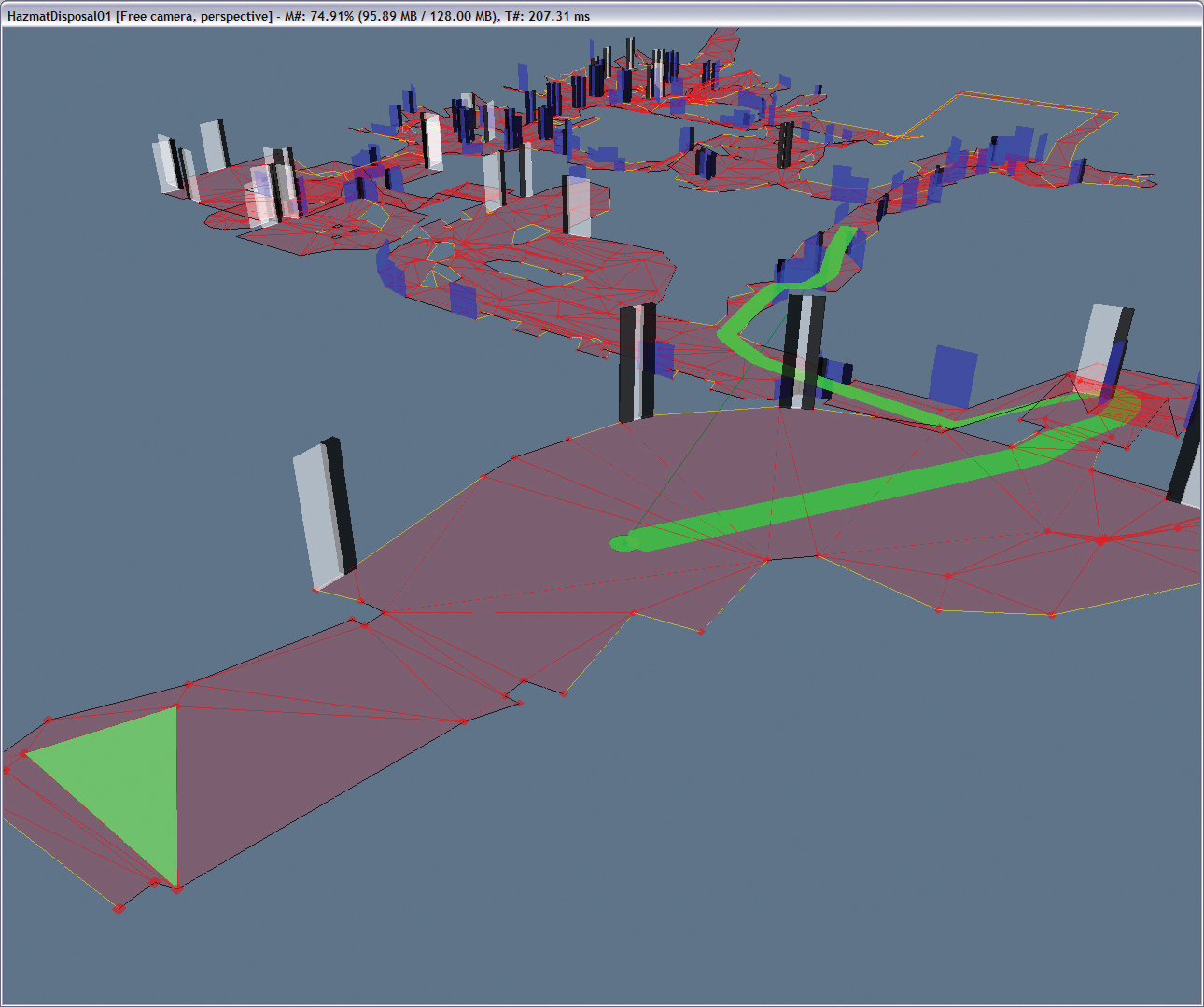
These same 2 methods can also be use for controlling where an agent can travel and is often used in games, but are reffered to as "NavMeshes".  This is probably the best approach to take as its already in common use with various techniques available for research.


This examples if from the "Fallout" series and the different color meshes indicated where NPC's are are to travel, as well as a preferred path to manoeuvre around the terrain.  This may seem limiting, but i think when combined with the forces, some interesting effect could be seen.

Sunday, 2 March 2014

Behavior Control

Here is the behavior node controlling a few different forces.  Currently its a linear interpolation between the forces, with a simple multiplier.  But the main idea behind this node it to later include the crowd traits into the system, to automatically adjust the forces.


Friday, 28 February 2014

Couple of Crowd Nodes

So a couple of crowd nodes have now been implemented and demos have been made to show some of the current effects.  Currently the demos are not land based but eventually the crowd will take this form


Seek Variations

Flocking

Obstacle Collisions

Next i will implement the behavioral node to help make these forces more controllable  when combined

Monday, 24 February 2014

Behavioural Weighting

I have the choose of following Mayas convention of applying forces based on each each nodes individual force. e.g.

If a gravity and wind node is applied, if you want to scale the effect down, you would have to scale the max force on both nodes, rather than having a global controller taking care of the whole system

Maybe i need to include a Global controller, listing all of the currently applied forces, and then use this UI to choose a weighting for each force.  Possibly include both an create the Global Controller after the main work is done.

Computing the Final force

I was thinking of ways to apply the final force computed from the crowd nodes.  I could either Follow Mayas convention of executing each node in the hyper-graph in order of the connection.

Or follow Houdinis VOP system, where it computes the result internally, and only outputs the final force.

The former allows the system to follow how Maya computes under the hood, but by computing the results internally (inside the CrowdFx) and outputting the force straight into the crowd agent, rather than connecting all of the Maya nodes and computing it using Mayas dependency graph could make for a simpler task.

Wednesday, 8 January 2014

Crowd Persoanlity/Traits

Some more thoughts on how the crowd could interact with other agents in the simulation is the idea traits, or a personality that could be could be defined by the user to control which behaviors are used.  Some illustrations to show the idea.

The behaviours would be the nodes like seeking and wandering, while these personalities/traits would be attributes that are defined by the user and control the next behaviour.

Thursday, 2 January 2014

Possible Crowd Behaviours

Some ideas for possible crowd nodes along with some illustrations of how the behavior may look
These are only ways in which the agent will maneuver around the environment, this does control any of the interaction that could possibly happen between the agents