

Monday, 31 March 2014

Saturday, 29 March 2014
Geometry Caches
Geometry caches are being used for the animation, This was chosen as the simplest way of using animation from any package, as obj is an industry wide format that every 3D package can export to. To simplify this process, i created a tool capable of both exporting and importing these caches

Wednesday, 26 March 2014
Two Part Process
I was hoping for the spawning of the agents to be accomplished in a single frame, but Mayas emit function, is unreliable when it comes to sub steps, so it seems the spawning will need to be done before the crowd simulation and saved as an initial state.
This may be a better way in the long run, as any kind of scripts can be used to generate a starting position for the agents
This may be a better way in the long run, as any kind of scripts can be used to generate a starting position for the agents
Monday, 24 March 2014

Sunday, 23 March 2014
Tools Needed for Maya Node Editor
Since switching to using Mayas Node editor, a few tools are needed to help make the use of this easier. So Ive created a few tools to make connecting some of the nodes easier, as the main one in use; the particleShape node has far too many connections for a user to sift through just to find field data for example

Thursday, 20 March 2014
Node Editor Comparison
Here are some examples showing the difference between the editors. With Mayas new features it makes it more than worth it to make the switch, as it now provides the functionality i was developing with my custom editor. Also the amount of nodes to make the trees match, as well as the look.

Friday, 14 March 2014
Possibility of Maya Node Editor
I've been playing with he recent additions to the Maya node editor from some advice, and now it is much more like modern editor like Houdini has or ICE. This may be a possibility as a replacement to the node editor
Tuesday, 11 March 2014
Spawn By Texture Implemented
The spawning feature of the crowd has been improved! It began as a simple Maya emitter, so any extra work would have to be done outside of the tool, but now texture emission can be chosen within the Emitter node and will accept the texture file using the gray scale map.
The downfall here is that this relies on a terrain UV's so this can only work with a single object easily. The next implementation will be geometry based as this provide more flexibility at the cost of a more complex simulation
The downfall here is that this relies on a terrain UV's so this can only work with a single object easily. The next implementation will be geometry based as this provide more flexibility at the cost of a more complex simulation
Friday, 7 March 2014
Connection Manager
Since the amount of nodes is increasing, and the possible types of connection are slowly increasing also, i needed a way to decipher what was being connected and act accordingly.
I have no created a class holding all possible connection types e.g.
I have no created a class holding all possible connection types e.g.
- Vector to float
- Float to Int
- Scene object to MObject
This has allowed me to have some error checking within the nodde connections, as if i haven't defined it here, then no attempt will be made by maya to automatically make a connection, which could be totally incorrect
Monday, 3 March 2014
Crowd Spawning & Navigation
After some more research into other crowd simulation, i found that there are a few approaches to choosing where the crowd can spawn.
These same 2 methods can also be use for controlling where an agent can travel and is often used in games, but are reffered to as "NavMeshes". This is probably the best approach to take as its already in common use with various techniques available for research.

This examples if from the "Fallout" series and the different color meshes indicated where NPC's are are to travel, as well as a preferred path to manoeuvre around the terrain. This may seem limiting, but i think when combined with the forces, some interesting effect could be seen.
- Texture Map - A gray scale map controlling areas a crowd can spawn
- Geometry - Extra geometry placed around the scene performing the same task as the texture maps
These same 2 methods can also be use for controlling where an agent can travel and is often used in games, but are reffered to as "NavMeshes". This is probably the best approach to take as its already in common use with various techniques available for research.
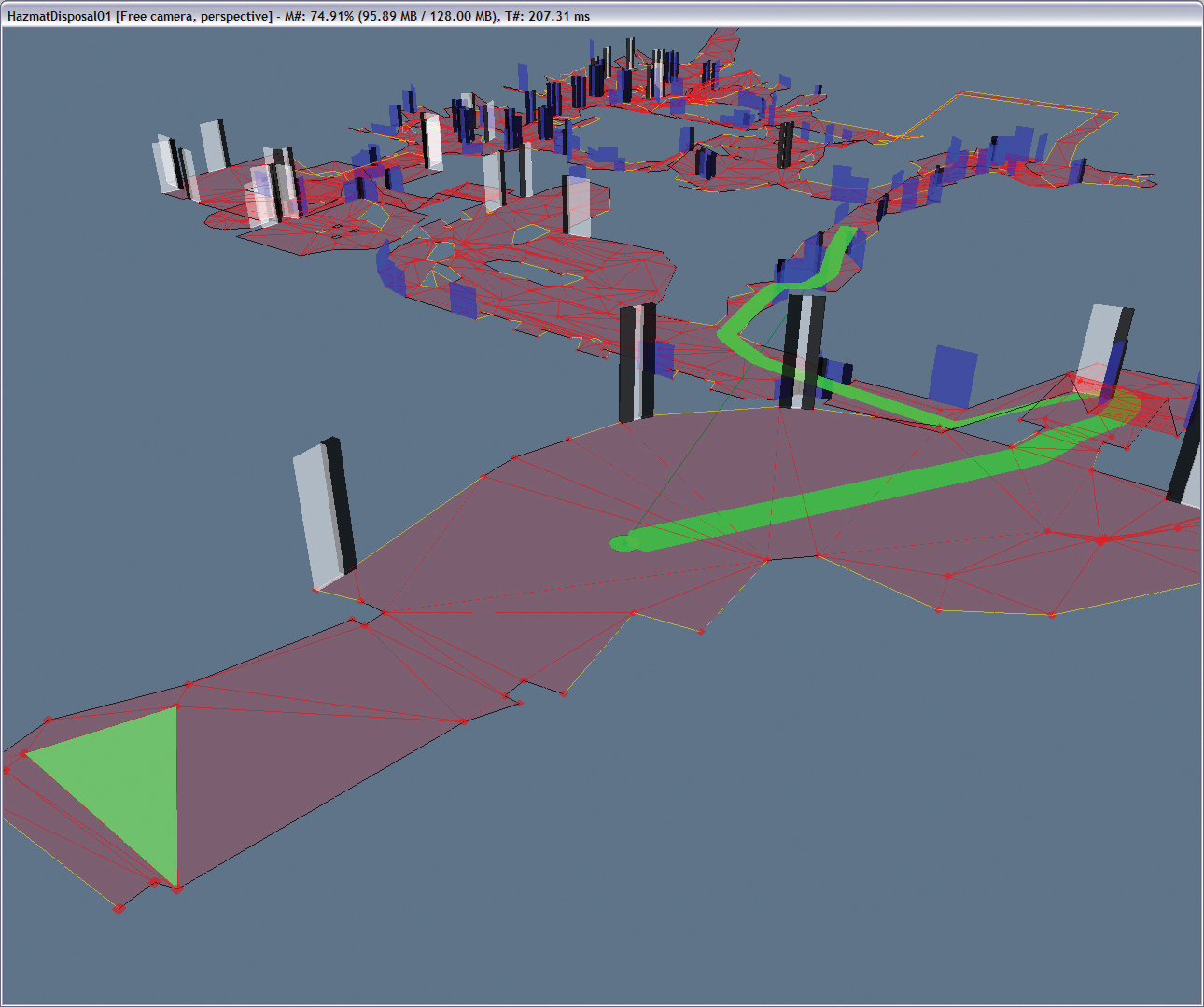
This examples if from the "Fallout" series and the different color meshes indicated where NPC's are are to travel, as well as a preferred path to manoeuvre around the terrain. This may seem limiting, but i think when combined with the forces, some interesting effect could be seen.
Sunday, 2 March 2014
Behavior Control
Here is the behavior node controlling a few different forces. Currently its a linear interpolation between the forces, with a simple multiplier. But the main idea behind this node it to later include the crowd traits into the system, to automatically adjust the forces.

Subscribe to:
Posts (Atom)